Waitlist open · dedicated AI secretary

The OS for your life.
Not “AI” — another you

Calendar, tasks, and chat share one context — a proactive secretary that fits in your pocket.
⚲ Tokyo · Kanagawa · Wed
15° / 12°
Rain after 18:00 · likely on your commute home
14
16
18
20
22
Pack a compact umbrella and one extra layer — we’ll pin it on Home if your bag has room.
Tue · May 12
Events 7Ideas 3Tasks 5
Calendar
10:00Review · 4F
14:30Seminar · Zoom
ME · LANE
11:30 71%
Deep work · 25m
Free lane · focus block
14:00 65%
Thank-you note
Post-lunch habit
18:20 58%
Share homework draft
Back-solved from deadline
Reverse alarmTomorrow · one spine to first commitment

Tuned in one shot from routes, prep, and station history.

Safety buffer+10 min · backup ping
Arrive 9:30Transit 45′ · prep 33′Wake 6:12
Voice task · listening
⚫ Work · finance⚑ Tomorrow EOD◆ Nakamura
me app
The Problem

The smarter AI gets,
the busier we feel

Ever feel that “AI should make life easier,” yet more tools and pings leave you *more* slammed?

Tool sprawl multiplies apps to babysit; chat pings demand instant replies. Somewhere past “AI efficiency,” many of us quietly inherited the extreme multitasking that executives once outsourced to entire assistant teams — except now it lands on one person: you.

01 / Working memory
Drain

The working memory tax

Switching between calendars and tasks drains focus. That fatigue is biology, not lack of talent.

02 / App switching
47switches / day

More ops, same operator

Lots of teams buy AI; far fewer truly operationalize it. In the end, you still carry the coordination burden.

03 / Delegation

True “hands-off” to another you

Stop bending to tools — let proactive me shoulder everyday judgment calls.

me is the life OS built to lower that load.

Join the Waitlist for a dedicated AI secretary →
Features

As your secretary, it moves autonomously.

Scroll →
01 · Setup once

Register once — AI supports your days,
comprehensively.

Add calendar, home, office, and commute once. me picks up the quick daily checks you barely notice — weather, delays, reclaiming gaps — so those minutes go back to what actually matters.

登録は一度だけ
Live · Home
Calendar自宅 / 会社通勤経路
移動を先読み
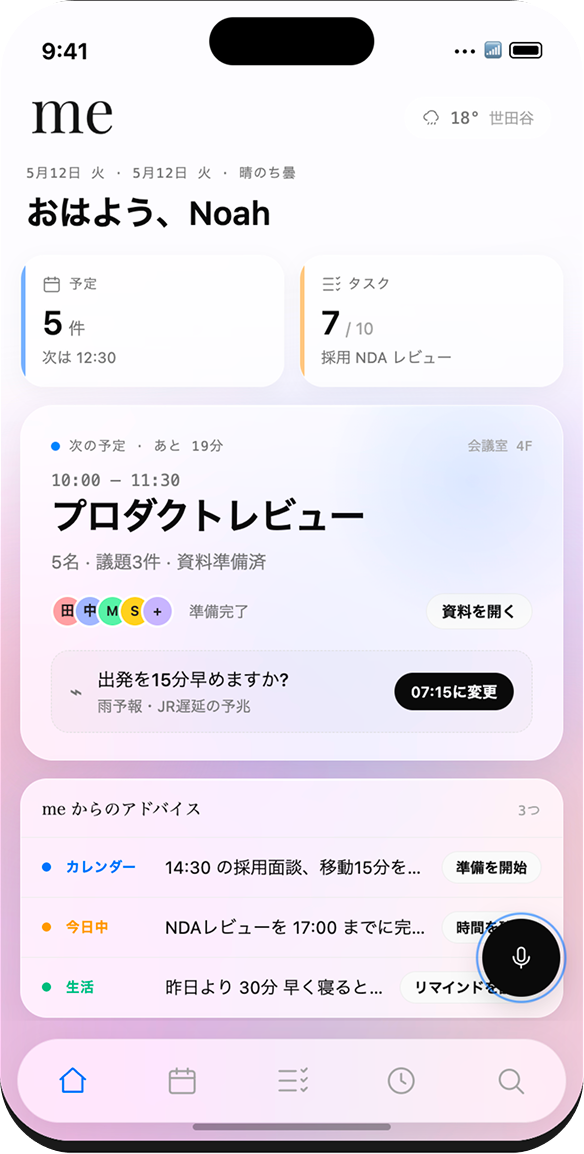
雨と遅延の兆し → 07:15 発 を提案

毎日ちょこちょこやっていた確認が、ホームにまとまって返ってくる。

02 · Home & Briefing

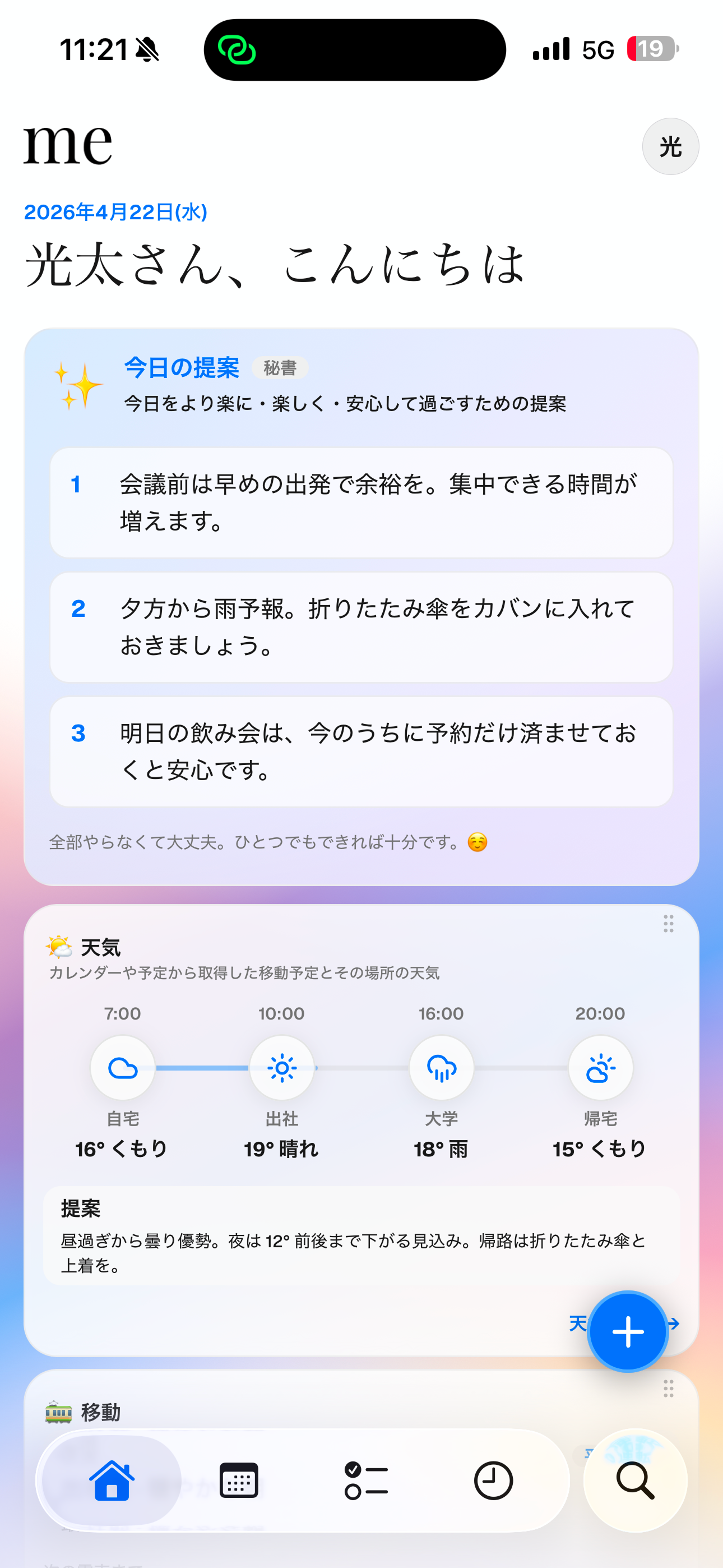
“Today” suggestions that read the room

One morning glance ties transit, weather, and schedule — umbrellas and gentle nudges appear before you ask.

Morning briefing
06:42
🚉
移動は山手線・遅延傾向
+8 min
夕方から雨予報 / 帰路 18:00〜
折りたたみ傘
📅
商談前に前回メモを準備しました
Ready
🌡
夜 12° まで低下、上着を1枚
15° / 12°
03 · Task & Calendar

Your calendar beside
me’s proposals.

Your commitments on the left, empty lanes and nudges from me on the right — side by side, never noisy. Only what you accept melts into the calendar.
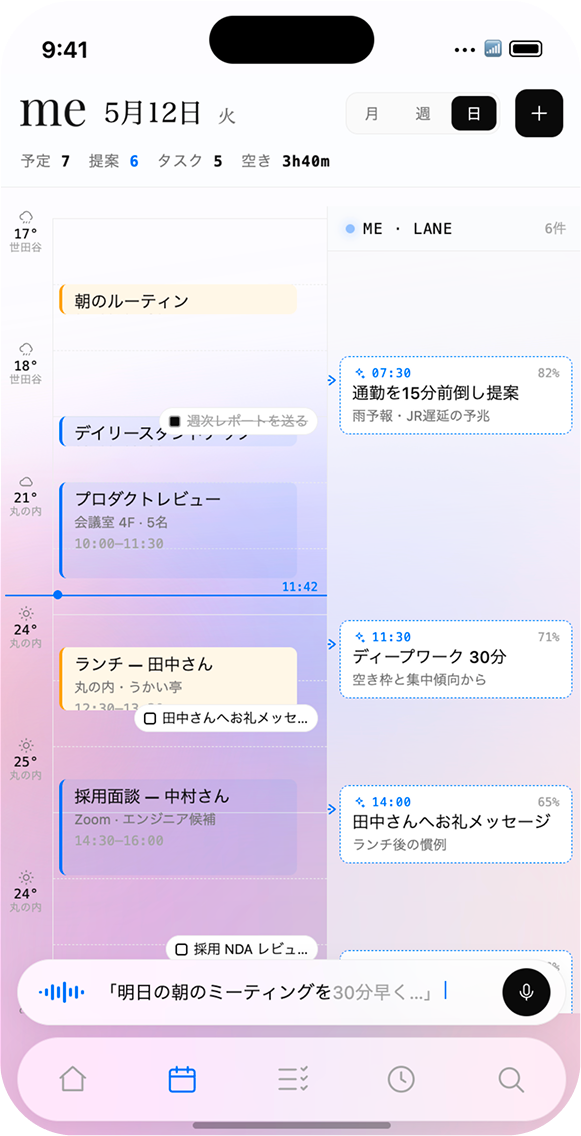
5月12日 火
予定 7提案 6タスク 5空き 3h40m
Google カレンダー
07:00
朝のルーティン
07:00–07:30
10:00
プロダクトレビュー
会議室4F · 5名
12:30
ランチ — 田中さん
丸の内・うかい亭
14:30
採用面談 — 中村さん
Zoom
ME · LANE3件
07:30 82%
通勤を15分前倒し
雨予報・JR遅延の予兆
11:30 71%
ディープワーク 30分
空き枠と集中傾向から
14:00 65%
田中さんへお礼メッセージ
ランチ後の慣例
04 · Proactive Time

Reverse alarms that refuse lateness

No “what time should I wake?” quizzes — first appointment, transit, and delay signals back-solve wake time, backups included.
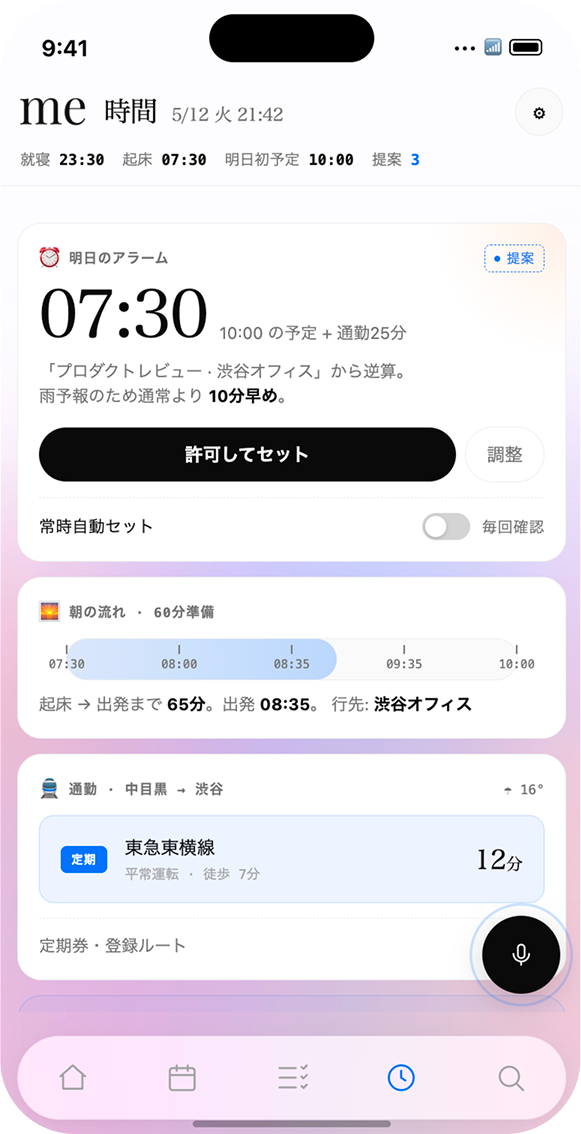
Tomorrow · Reverse plan
9:30 着
06:12
Wake
遅延 +8 min バッファ込み
06:22
予備アラーム
10 分後 / 念のため
23:10
就寝リマインド
睡眠 7h を確保
05 · Predictive task split

Rough chat in — subtasks out, tuned to you.

Describe a fuzzy goal or deadline in chat; me predicts steps from your profile and thread history, splitting work into actionable checks. Edit, confirm, and it flows into blocks and reminders.
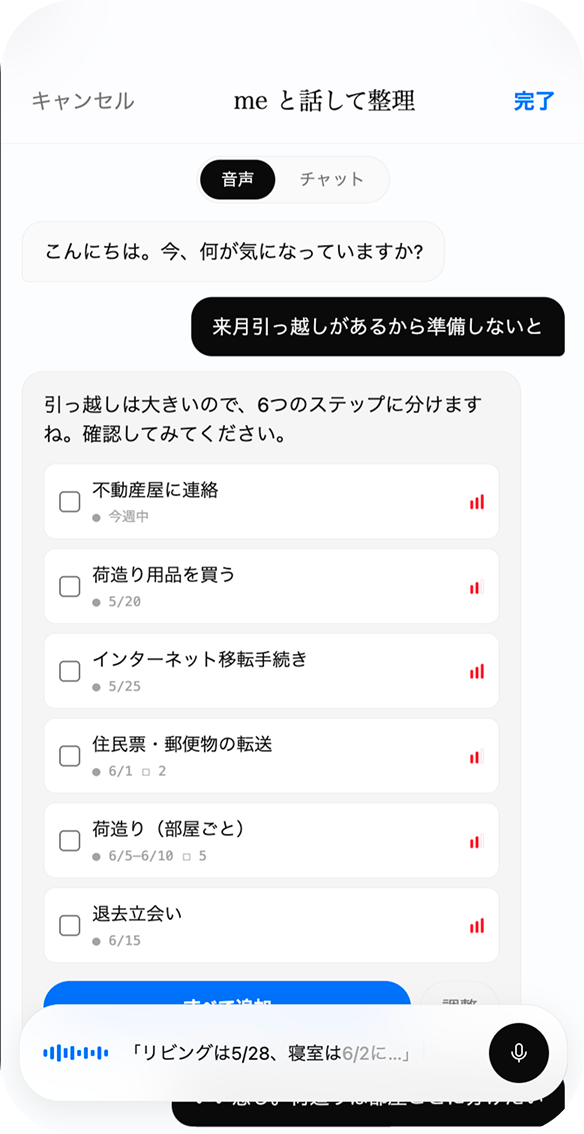
me と話して整理
Voice / Chat
「来月引っ越しがあるから準備しないと」
me大きなので 6 ステップに分けました。期限はあとから調整できます。
引っ越し期限あり履歴参照
不動産屋に連絡
今週中
インターネット移転手続き
5/25 まで
荷造り(部屋ごと)
6/5–6/10
編集して完了 → タスク一覧・リマインダーへ反映
01 / 05Horizontal scroll
Use Cases

How me moves through a day

Keep your schedule — me slips suggestions into the gaps.

Wed · Apr 22 / Weekday
PersonalMeetingsFocusTransitme proposals
06:30
Wake · routine Home
Wake time backed by your first commitment and transit signals, with delay buffer.
m
Suggested by me
Reverse alarm
Yamanote looks ~8 min heavy — I’ll wake you at 6:12, 18 minutes earlier 👍
Fewer fragile morning decisions
07:00
Commute · inbox skim Move · Yamanote
Into the city; light triage on the train.
10:00
Client meeting Meeting · Marunouchi
Discussing a new proposal.
m
Suggested by me
Pre-brief
15 minutes before, I’ll pin last notes & proposal draft v0.3 on Home ✨
Almost zero prep RAM
12:00
Lunch Break
Out with teammates.
14:00
Deep-work block (deck) Focus · 2h
Notifications muted; heads-down work.
m
Suggested by me
Auto-block
You said you wanted focus — I carved 2h and flipped Slack to DND 🔕
Afternoons lost to coordination come back
17:00
Internal sync Meeting
Weekly review.
19:00
Daily wrap Wrap-up
Close the loop in 15 minutes.
m
Suggested by me
Auto-review
Moved 3 open items to tomorrow AM and drafted a one-line recap 📋
Less bedtime anxiety
23:30
Sleep Sleep
Trust & Privacy

Your data stays
on your device.

We answer the anxiety of handing calendars and notes to software with hard guarantees: no silent cloud uploads, and training signals stay non-identifying.

On-device first

Calendars and notes stay on-device by default; cloud sync only after explicit consent.

End-to-end encrypted

Synced scopes are end-to-end encrypted — keys never leave your hardware.

Approve before execution

Sensitive moves surface as proposal cards and run autonomously only after you approve.

local · calendar.dbe2e · noteslocal · health.kitmasked · feedback
Pricing

Lighter than hiring staff — seriously.

Three tiers — explorers and deep delegators alike. Annual billing saves up to 22%.

m Free
 
¥0/ free forever

Let another-you skim your basics — plenty for lightweight life ops.

Join Waitlist (Free)
  • Chat + tasks + calendar
  • Morning briefing (once daily)
  • Core auto-optimization
  • Reverse alarms · rain/delay tuning
  • Chat-to-subtask split (full detail Lite+)
No credit card
m Lite
 
¥980/ mo

Balance work + life with another-you carrying the load — the sweet spot for most.

Join Waitlist (Lite)
  • Everything in Free, plus
  • Reverse alarms · weather & delay adjustments
  • Daily schedule & task optimization
  • Email summaries & reply drafts (50/day)
  • Rich subtask split · A2A coordination · priority support
7-day free trial
Cancel anytimeStudent plan · 50% offTeams & enterprises · contact us
FAQ

Questions

Built for people who delegate — tell us what else you need at hello@me.app.

Email us
me isn’t just Q&A — it keeps rich personal context and acts ahead of you. From habits to schedules, it anticipates before you spell things out.
Calendars, notes, health signals, and similar data stay on-device first. Anything that syncs ships with end-to-end encryption, keys remaining only on your hardware.
Never silently. Bookings, outbound mail, purchases, etc. arrive as proposal cards and execute only after approval — or scoped auto-delegation when you explicitly allow it.
Closed beta today targets iPhone on iOS 17+. Android, iPad, watchOS ship progressively through 2026. Desktop arrives later for Pro members first.
Yes — Google / Apple / Outlook calendars, Gmail / iCloud mail, Notion / Apple Notes / Reminders. Slack · LINE · Outlook extras preview for Pro.
Anytime. Upgrades prorate; downgrades apply next cycle. Even after cancel, your context and memories stay intact for seamless return.
Native polish for Japanese & English at boot. Chinese (Trad/Simp), Korean, Spanish, French, German roll through 2026.
Install

Give thinking time
back to you.

Reclaim the hours lost tab-switching and negotiating calendars.

Join the Waitlist
iOS · BetaOne-minute setupNo credit card
Dedicated AI secretary · Waitlist